Voice note · 0:15
WhatsApp
fwd: contract v3 — "can you look before Thu?"
Promised
"I'll send the revised terms by Friday"
Downloads
Q3-financial-report.pdf · 80 pages
9:15 today
Call w/ Sarah — renewal + SSO clause
Gmail · DORI
RE: Q3 numbers — Asha, Thursday
Your AI executive assistant

The assistant that never forgets
a promise.

Less to remember. Less to chase. Less to do.
More room to think.

Coming soon — sign up for early access

Works with the AI subscription you already have · Your data stays in files you own

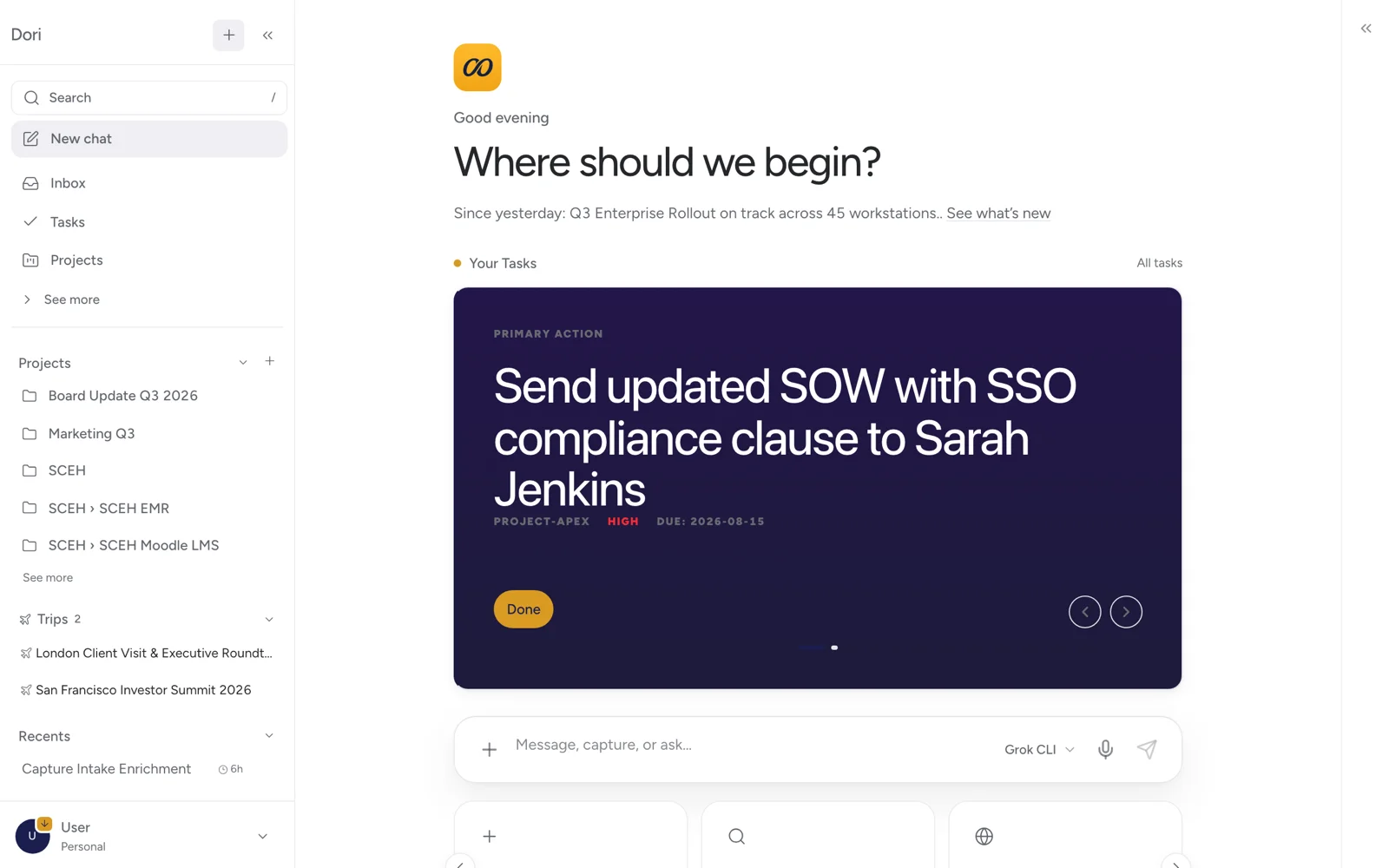
Dori home screen showing today's priority: send the updated SOW with SSO compliance clause to Sarah Jenkins

Dori Desktop — your day, already triaged.

Step one — capture

Getting work into Dori takes seconds.

No tagging. No filing. No "I'll write it up later." Dori meets you where the thought happens.

Say it on WhatsApp

Message Dori like a colleague. A 15-second voice note on the walk between meetings is transcribed, tagged, and linked to the right client before you're back at your desk.

Drop the file, walk away

Point Dori at Downloads, Desktop, or any folder. A client sends an 80-page report — you save it, Dori reads it, files it, and connects it to the account it belongs to.

Your calls take their own notes

Connect Fathom, Google Meet, or Microsoft Teams once. Every recorded meeting becomes structured notes on its own — nothing to upload, nothing to forward.

Paste a link or a video

An article worth keeping, or a 46-minute talk you will never sit through. Dori reads or watches it and keeps what was actually said, so you can ask about it later.

Photograph a bill

A restaurant bill, a hotel invoice, a taxi receipt. Dori reads the amount, the date and who it was for, and puts the line into your ledger.

Hand over a recording

An audio file from a call you took elsewhere, or a meeting nobody minuted. Dori transcribes it and files it against the people and the project it belongs to.

Everything you add lands in a project. So when you ask about that client, Dori looks only at that client’s files — a small, checkable set rather than a guess across everything you own.

One Tuesday, hour by hour

A busy day that sorts itself.

7:20on the way in

Ask Dori what needs attention today and it gives you the three things that matter, in the order they matter.

8:45walk in briefed

Instead of digging through old meeting notes before a client meeting, you open the client page and find every decision, commitment and open item from the last six months.

9:15the call

Record the call and get a transcript. Dori turns it into what was decided, what happens next, and who agreed to do it.

10:05the promise

You said on the call that you would send the pricing deck by Friday. Dori picked that up from the transcript and put it on your task list.

11:30between meetings

Send Dori a voice note on WhatsApp about a project update. It is transcribed and filed against the right project before you are back at your desk.

12:40client lunch

Take a photo of the bill. Dori reads it, records the amount and adds it to your reimbursement log.

2:15the report

A client sends a long report. Save it to your folder and Dori reads it, so you can ask it questions later instead of scrolling through it.

3:30the invoice

Instead of trying to remember what you did for a client this month, ask Dori and it lists every meeting, call and document, ready to put on the invoice.

4:00the proposal

Ask Dori to draft the proposal. It uses this morning’s call and your voice note, and writes it in the same style as your last three.

5:10half-remembered

You have a nagging feeling you agreed something with a client last month. Ask Dori and it shows you the exact line from the transcript.

6:20not work

Drop your son’s school timetable in once. Ask what he has tomorrow and Dori tells you, without you opening the PDF.

6:45log off

Everything from today is written down and searchable. Nothing is left in your head overnight.

Frugal by design

Most of what Dori does costs nothing to run.

95%fewer tokens

to find something or answer a question. Measured against a real working vault of about 2,800 files, not a demo folder.

Dori does the reading, filing and searching itself, and only calls the AI when a question genuinely needs one. Your subscription lasts longer, and there is no separate API bill.

Total recall

Ask, instead of hunting.

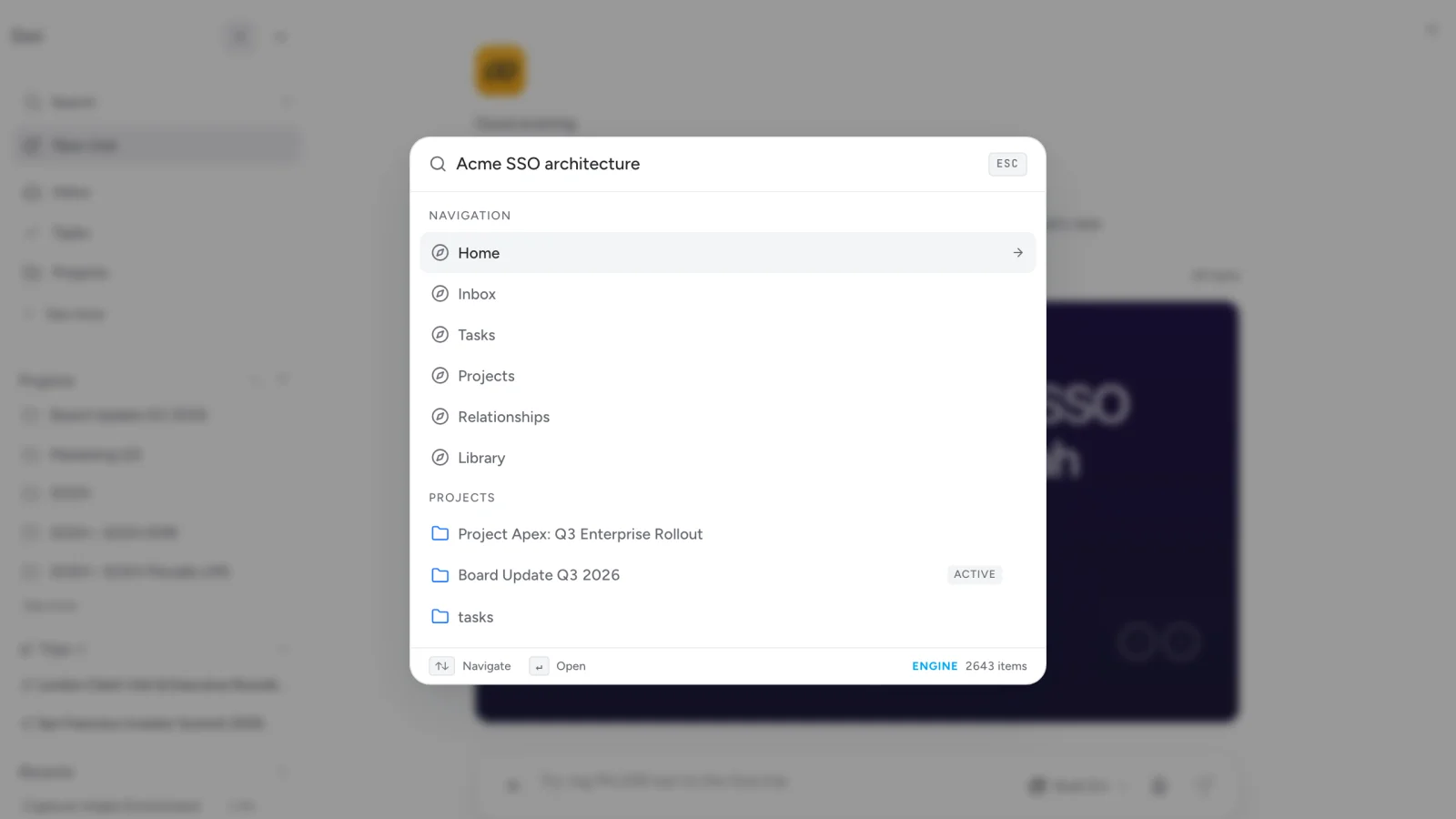
"What did we agree with Acme last quarter?"

Dori answers from everything you've ever captured — meetings, voice notes, files, decisions — and links back to the exact source.

Search runs locally on your Mac, across thousands of items, in plain language. You never tagged or filed any of it.

Dori's command palette answering a search across 2,643 items in the vault
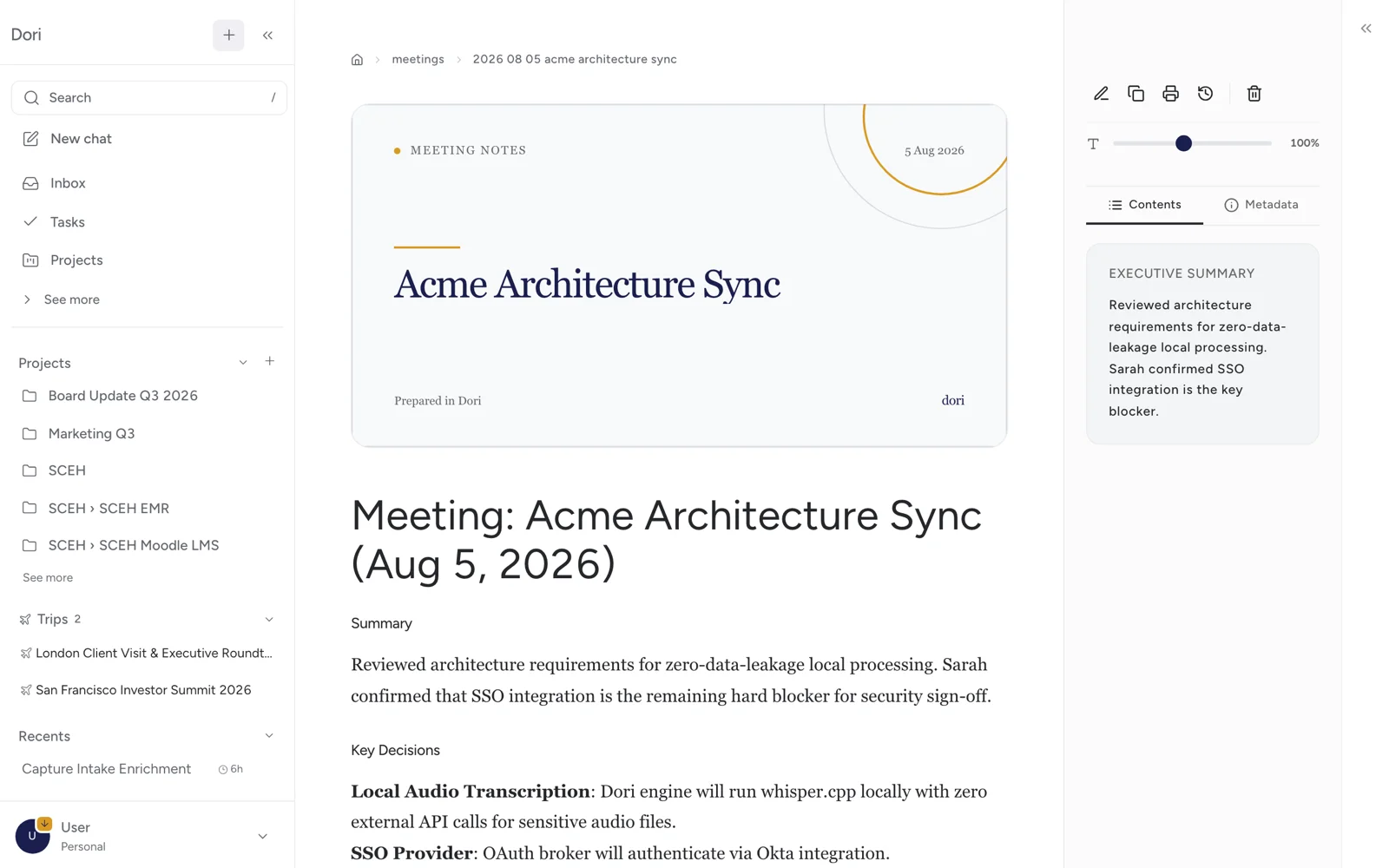
Meeting notes

Every call becomes a record of what was decided.

Summary, decisions, and follow-ups — extracted from the transcript automatically, and linked to every person who was in the room.

Six months later, "what did Sarah confirm about SSO?" has an answer with a source.

A meeting recording turned into structured notes with an executive summary and key decisions
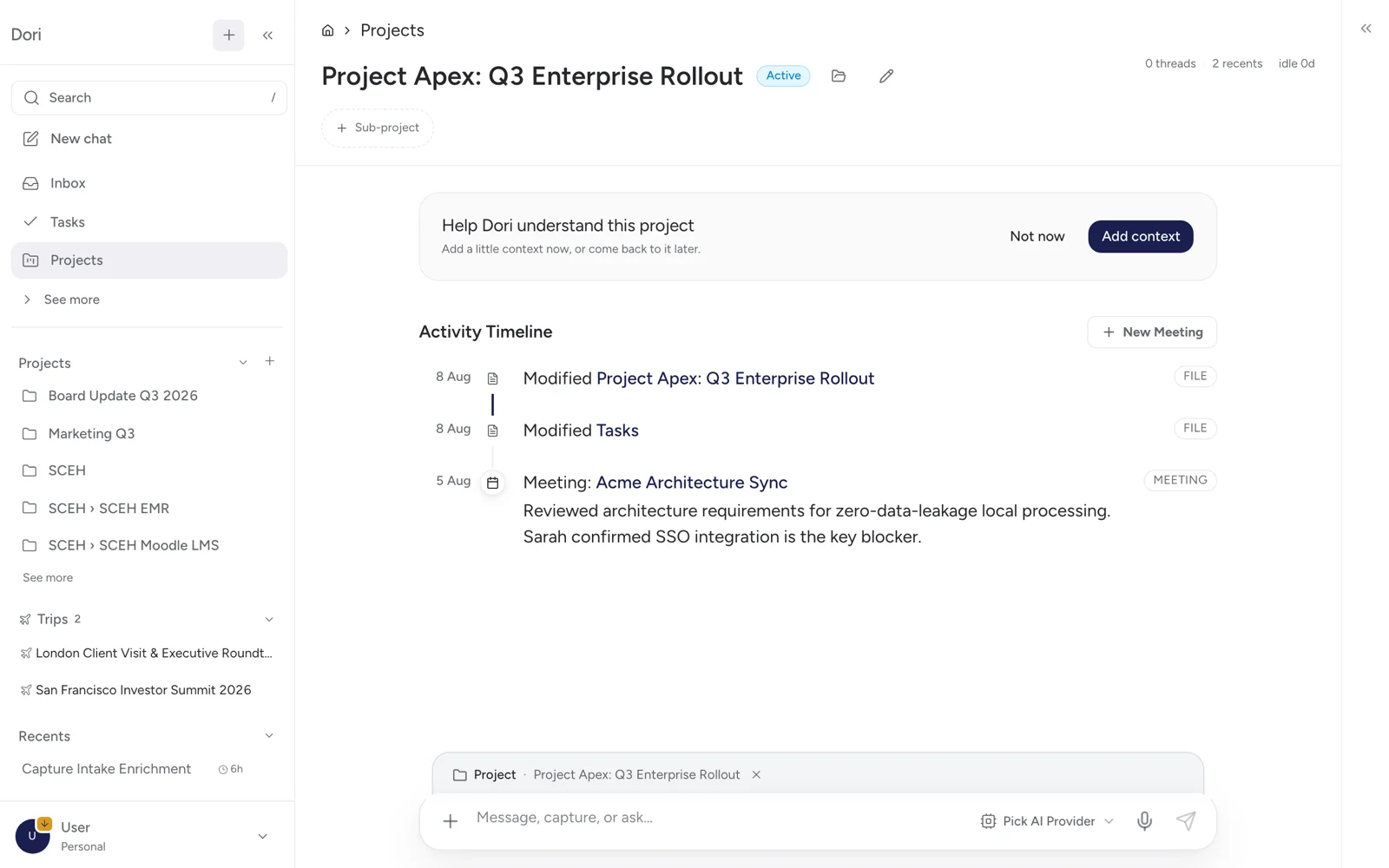
Projects & relationships

Walk in already briefed.

Every client, project, and person keeps a running timeline — what was said, what was decided, what's still open.

People link to accounts, accounts link to projects, projects link to meetings. The picture assembles itself.

A project page in Dori showing an activity timeline of file changes and linked meetings
Not another chatbot

Keeps your Claude.
Makes it smarter.

Dori doesn't replace Claude, ChatGPT, or Codex — it's the memory underneath them. Everything it knows is available wherever you already work.

Bring the AI you already pay for

Connect your existing Claude or ChatGPT plan and Dori routes the heavy thinking there. No new subscription, no surprise API bill.

Your memory, inside your tools

Over MCP, Claude Code and Cursor can query your Dori memory directly — and Dori can call your external tools in return. Two-way, open standard.

Reads only the files you permit

You choose which folders Dori can see. Nothing outside them is ever opened or read.

Never explain the background twice

Dori gathers the right files and your instruction into one package you can hand to any AI, so it starts out already knowing the situation.

Yours, permanently

Plain files you can open.
Yours forever.

Everything Dori knows is kept as ordinary files, on your own Mac or in your own Google Drive — never in a vendor's database. Change your AI, or stop using Dori altogether, and everything you have built is still there.

Private by design

Your notes, clients and decisions stay where you keep them, on your own Mac or your own Google Drive. Dori never trains on your data — and every action it takes is logged in an audit trail you can inspect.

You stay in charge

Nothing becomes automatic without your say-so. Learned rules wait for your approval, and the audit trail shows every read, write, and send — so trust is verified, not assumed.

No lock-in, ever

If you stop using Dori tomorrow, you lose nothing. Every file stays on your drive in plain text — a compounding asset that outlives any model, and any vendor. Including us.

Who it's for

Built for people who carry a lot.

If your work is a web of relationships, promises, and threads — Dori is the memory underneath it.

Founders

CEO · Co-founder · Operator

You're running the company inside your head — the investor call, the product decision made on a walk, the open thread with your co-founder. Dori holds the whole picture so you can focus on what's next.

Consultants & Advisors

Consultants · Analysts · Advisors

Each client is a world of context. Dori keeps every one separate and current — commitments, commercial terms, history — so you always know exactly where you left off, whichever hat you're wearing today.

Business Leaders

CXO · VP · Chief of Staff

Ten meetings a week, each with its own history. Dori walks in ready — what was said last time, what's still open, and the context to ask the right question at the right moment.

Waitlist

Coming soon.

Dori is not open yet. Join the waitlist and we will tell you when your place comes up. Early users help shape what it becomes.

Early access

What early access includes

The full Dori experience — capture, memory, meeting notes, and the assistant itself. Pricing will be announced at launch.

  • Capture by WhatsApp, voice note, or watched folder
  • Meeting notes from Fathom, Google Meet & Teams
  • Ask-anything memory across everything you've captured
  • Projects, people & client accounts, linked automatically
  • Your files stay yours — and work with any AI model
Get Dori →

Coming soon — sign up for early access

Questions

Frequently asked

Is this really like having an executive assistant?
That's exactly how to think about it. A great EA remembers your preferences, knows your projects and the people in them, organises your chaos, and shows up ready with context when you need it. Dori does all of this — automatically, privately, and without the overhead of managing another person. The difference is Dori gets better the more you use it, works 24/7, and costs almost nothing to run.
Do I need to be technical to use Dori?
Not at all. Setup takes about ten minutes. If you can use Google Docs, you can use Dori. And the help center walks through everything — from your first capture to connecting meeting sources.
Who can see my data?
Your vault sits in files you own and control, on your own Mac or your own Google Drive — not in a vendor's database. Dori does not train on it and does not sell it. The one thing to be clear about: when a question genuinely needs an AI model, the relevant part of your material is sent to the provider you chose — Anthropic, OpenAI or another — and is handled under that provider's terms. Most of what Dori does never reaches a model at all, and the audit trail shows you every call that was made. If Dori disappeared tomorrow, the files are still yours, readable, and complete.
Does Dori replace my AI subscription?
No — Dori makes the subscription you already have more useful. Think of it as the memory your Claude or ChatGPT is missing. Dori keeps all of your context, then sends the model only the part that actually answers the question. A session starts with the right background instead of a blank slate, and you are not paying extra API fees to get it.
What if I want to switch AI models?
Just change one setting. Your entire operational memory — notes, people, threads, decisions — is stored as plain files, not inside any AI provider's systems. Switch freely, any time, and the new model starts with everything the old one knew.
How is this different from Notion AI or ChatGPT memory?
Notion AI works on documents but doesn't connect conversations, voice notes, meetings, and WhatsApp messages into one memory. ChatGPT memory is limited, vendor-controlled, and disappears if you switch models or plans. Dori gives you an open, growing, structurally-linked memory that works with any model — including ones that don't exist yet.
Join the waitlist

Be the calmer version of yourself.

Dori holds the context, tracks the threads, and makes sure nothing slips. Give it a week — the day will feel different.

Coming soon — sign up for early access